
Are you ready to take your Video Editing Secrets content from mediocre to mesmerizing? In a world where attention spans are constantly dwindling, the power of compelling visuals cannot be overstated. Whether you’re a seasoned videographer or just starting out, mastering the art of video editing can truly elevate your content to the next level. Welcome to the realm of Video Editing Secrets – where we unveil the hidden techniques and expert tips that can transform your videos from ordinary to extraordinary.
In this article, we’ll delve into the captivating world of video editing, uncovering a treasure trove of secrets that will revolutionize your approach to creating dynamic and engaging content. From subtle yet impactful color grading methods to seamless transition tricks, we’ll explore how these insider techniques can captivate your audience and leave them craving more. Get ready to unlock the potential of storytelling through visual mastery as we guide you through the maze of video editing secrets that will set your content apart in today’s crowded digital landscape.
Mastering Seamless Transitions: The Art of Visual Flow
Mastering seamless transitions is the hallmark of a skilled video editor, elevating the visual flow and storytelling of any project. One secret to achieving this art lies in understanding the rhythm and pacing of each scene, allowing for transitions that enhance rather than disrupt the viewer’s experience. By utilizing techniques such as match cuts, whip pans, or L-cuts, editors can create an immersive journey for their audience, seamlessly guiding them from one moment to the next.
Furthermore, paying attention to color grading and composition can significantly enhance visual flow. Consistency in color palettes throughout scenes not only adds aesthetic appeal but also aids in creating a sense of coherence and unity. Additionally, strategically framing shots with complementary angles and movements can naturally lead viewers from one scene to another without jarring disruptions. Embracing these key elements allows video editors to masterfully craft a captivating visual story that unfolds seamlessly before the audience’s eyes.
In summary, mastering seamless transitions goes beyond technical prowess; it requires an appreciation for rhythm, color harmony, and composition. These elements work together harmoniously to elevate a video’s visual flow and create a captivating viewing experience. By incorporating these insights into their editing process, aspiring videographers can unlock the secrets to crafting compelling narratives that pull audiences in and keep them engaged until the very last frame.
Color Grading Techniques: Transform Your Footage with Impactful Tones
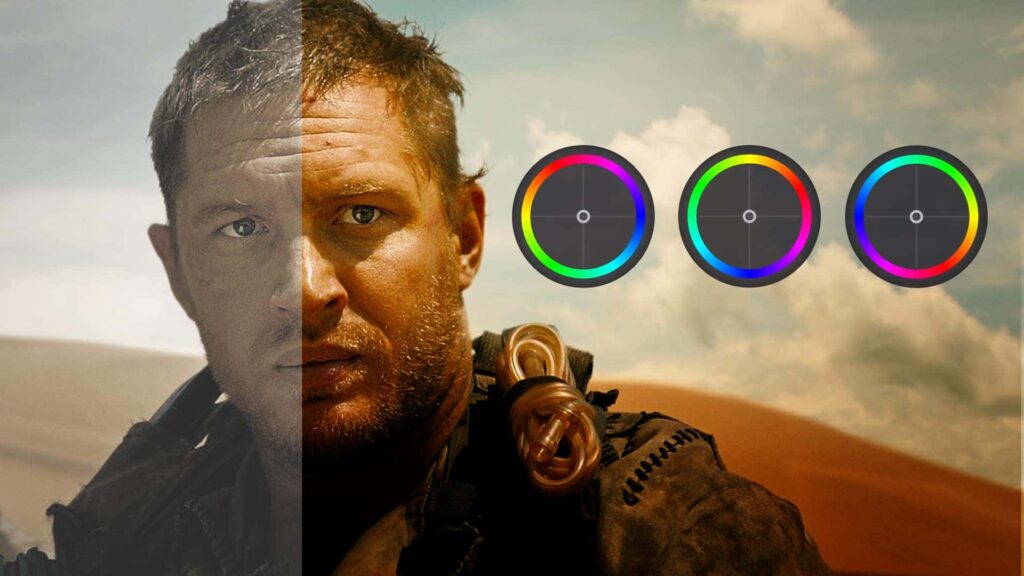
Color grading techniques are the secret weapon of professional video editors, allowing them to transform ordinary footage into visually stunning masterpieces. One impactful technique is the use of complementary color tones to create a dynamic and engaging visual experience for the audience. By strategically adjusting the colors within a scene, editors can evoke specific emotions and enhance storytelling in powerful ways.
Another key aspect of color grading is understanding the psychology behind different color palettes and their impact on viewer perception. By harnessing the emotional power of warm tones like reds and oranges or cool tones like blues and greens, editors can guide the audience’s emotional response to a scene with remarkable precision. Understanding how different hues can influence mood and atmosphere allows for greater creative control over the visual narrative, making color grading an essential skill for any serious video editor.
Incorporating advanced color grading techniques can truly elevate video content to new heights, captivating audiences with breathtaking visuals that leave a lasting impression. With the right knowledge and skillset, video editors can unlock the full potential of their footage, leveraging impactful tones to create unforgettable viewing experiences that keep viewers coming back for more.
Optimizing Audio Layers: Crisp Sound Solutions for Your Videos
When it comes to creating captivating videos, audio quality plays a crucial role in engaging the audience. One key strategy for optimizing audio layers is to carefully balance different elements such as background music, voiceovers, and sound effects. By adjusting the levels of each layer, you can ensure that the final mix delivers crisp and clear sound without overwhelming the viewer.
Another valuable technique is to pay attention to frequency range and EQ settings. Tinkering with these parameters can help eliminate unwanted noise while enhancing the richness of your audio. It’s also important to consider spatial effects like reverb and panning, which can add depth and dimension to your soundscapes, ultimately elevating the overall viewing experience for your audience.
By incorporating these video editing secrets into your workflow, you can achieve professional-grade audio quality in your videos and leave a lasting impression on your viewers. Experimenting with different combinations of audio layers and fine-tuning their properties will enable you to unlock new creative possibilities and set your content apart from the rest.
Creative Text and Typography: Engaging Titles that Pique Interest
When it comes to creating engaging titles for video content, typography plays a pivotal role in capturing the audience’s attention. A clever use of creative text can instantly pique interest and draw viewers in, setting the stage for an immersive viewing experience. From playful and whimsical fonts to bold and impactful typography, the visual representation of a title can effectively convey the tone and theme of the video, enticing audiences to click play.
Incorporating unconventional text layouts and attention-grabbing typographic elements can add an extra layer of intrigue to video titles. By experimenting with different font styles, sizes, and colors, content creators can evoke curiosity and captivate viewers from the moment they encounter the title. Whether it’s through dynamic animations or innovative typographic compositions, embracing creativity in text design can elevate video titles from mere placeholders to enticing invitations for exploration.
Infusing a touch of storytelling into video titles through clever typography enables content creators to entice their audience with hints of what’s to come. By crafting titles that embody the essence of the narrative or highlight key elements within the video, creators can cultivate anticipation and curiosity among their viewers. Utilizing imaginative text treatments combined with compelling visuals allows for an immersive introduction that primes audiences for an engaging viewing experience filled with captivating visual narratives.
Storytelling through Editing: Crafting Narratives in the Post-Production Phase
In the world of video editing, storytelling takes on a whole new dimension in the post-production phase. This is where the magic happens as editors weave together raw footage to create compelling narratives that captivate and resonate with audiences. One of the key secrets to effective storytelling through editing is understanding pacing and rhythm. By carefully manipulating the timing and flow of visuals, editors can evoke emotions and guide the audience through a journey of highs and lows, creating a dynamic and engaging narrative.
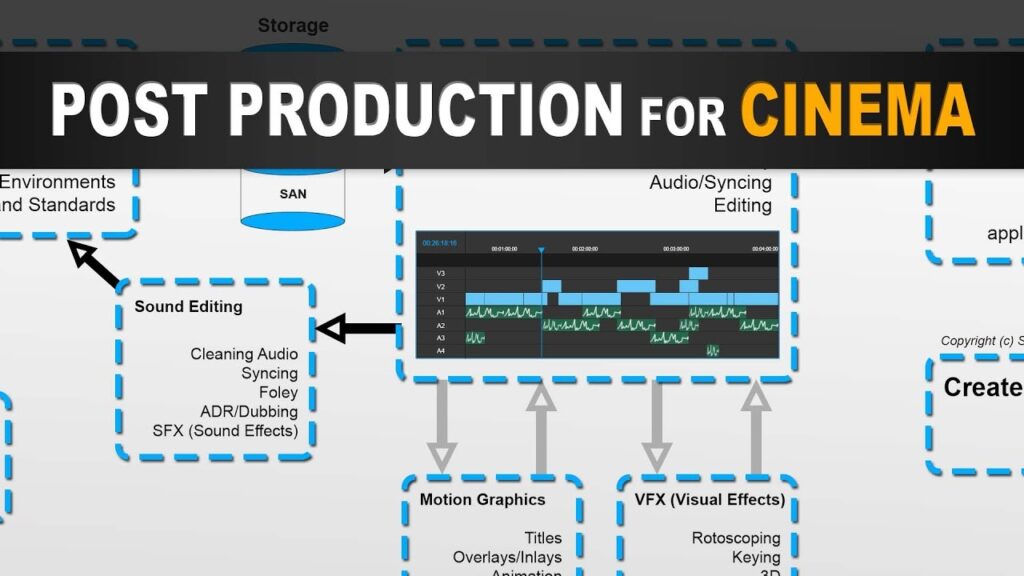
Another essential aspect of crafting narratives in post-production is the art of visual continuity. Seamless transitions, consistent color grading, and matching visual aesthetics are all crucial elements that help maintain coherence in storytelling. A well-executed edit not only enhances the narrative but also propels it forward, maintaining the viewer’s engagement throughout. Furthermore, strategic integration of sound design can be a game-changer in enhancing storytelling through editing. By leveraging sound effects, music, and ambient noise, editors can elevate emotional cues within a narrative while reinforcing thematic elements to create a truly immersive viewing experience. Ultimately, storytelling through editing transcends mere technical prowess; it is a harmonious blend of creativity and technical proficiency that breathes life into raw footage, shaping it into an enthralling story that lingers long after the final frame fades to black.
Conclusion: Video Editing Secrets: Elevate Your Content to the Next Level
In conclusion, mastering the art of video editing Secrets can truly elevate your content to the next level. By implementing the secrets and techniques discussed in this article, you have the power to captivate and engage your audience in a way that sets your work apart from the rest. Whether it’s through seamless transitions, effective color grading, or compelling storytelling, video editing Secrets is a skill that can make a significant impact on the quality of your content. So take the time to practice and refine your editing abilities, experiment with new tools and effects, and never underestimate the power of attention to detail. With dedication and creativity, you can transform your videos into powerful pieces of visual storytelling that leave a lasting impression on your viewers Video Editing Secrets.
————————————————————————————————————————
FAQs
Q: What is the best software for video editing?
A: There are many great options, but some popular choices include Adobe Premiere Pro, Final Cut Pro, and DaVinci Resolve Video Editing Secrets.
Q: How can I improve the audio quality of my videos?
A: Use a high-quality microphone and consider adding background music or sound effects to enhance the overall audio experience Video Editing Secrets.
Q: What are some tips for creating engaging video transitions?
A: Experiment with different transition effects, use smooth and seamless transitions, and match transitions to the mood of your content Video Editing Secrets.
Q: How can I make my videos stand out on social media platforms?
A: Focus on storytelling, use eye-catching visuals, create attention-grabbing thumbnails, and optimize your videos for each platform’s specifications Video Editing Secrets.
Q: Are there any techniques for optimizing video content for mobile devices?
A: Keep text large and easy to read, use square or vertical aspect ratios, and ensure that important visual elements are not lost on smaller screens Video Editing Secrets.
Q: What are some effective ways to color grade my videos?
A: Experiment with different color schemes, use color grading tools in your editing software, and consider the emotional impact of different color palettes Video Editing Secrets.
Q: Can you provide tips for speeding up my video editing Secrets workflow?
A: Organize your footage before starting, use keyboard shortcuts to streamline tasks, and consider using pre-made templates or presets for certain effects Video Editing Secrets.
Q: How can I add professional-looking graphics and animations to my videos?
A: Utilize motion graphics templates, custom overlays, or animated text to add visual interest and professionalism to your video content Video Editing Secrets.